Architecture
vCluster provisions tenant clustersTenant ClusterA fully isolated Kubernetes environment provisioned for a single tenant. Each tenant cluster has its own API server, controller manager, and resource namespace, backed by a virtualized control plane hosted on a Control Plane Cluster. From the tenant's perspective it behaves exactly like a standard Kubernetes cluster. on your infrastructure or directly on bare metal. Two choices shape your deployment architecture: where the control plane runs, and how worker nodes are deployed. Together, these determine the isolation level each tenant receives.
Control plane
Every tenant cluster runs a dedicated control planeControl PlaneThe container orchestration layer that exposes the API and interfaces to define, deploy, and manage the lifecycle of containers. In vCluster, each virtual cluster has its own control plane components.. The control plane manages all operations within the tenant cluster and is completely invisible to tenants. It contains:
- A Kubernetes API server, the management interface for all API requests within the tenant cluster.
- A controller manager, which maintains the state of Kubernetes resources like pods, ensuring they match the desired configuration.
- A data store, which stores all API resources. By default, an embedded SQLite database is used, but you can choose other data stores like etcdetcdA distributed key-value store that provides reliable storage for Kubernetes cluster data. In vCluster, etcd can be deployed externally or embedded within the vCluster pod., MySQL, and PostgreSQL.
- A syncer, which synchronizes resources between the tenant cluster and the underlying infrastructure.
- A scheduler, an optional component for scheduling workloads. By default, vCluster reuses the Control Plane Cluster's scheduler to reduce resource usage. You can enable the virtual scheduler when you need node labels, taints, drain operations, or custom scheduling behavior.
All of these components run together in a single container within a StatefulSet pod. The API server, controller manager, data store, and syncer are one unified process. CoreDNS deploys as a separate pod in the same namespace. If you opt into external etcd, it runs as its own StatefulSet. On the underlying cluster, kubectl get pods -n <vcluster-namespace> shows something like:
NAME                                 READY   STATUS    AGE
vcluster-0                           1/1     Running   5m
vcluster-coredns-6b9f8d6f6b-xk2p9    1/1     Running   5m
Where that control plane runs is your first architectural choice.
On an existing Kubernetes cluster
The default deployment mode. The tenant cluster control plane runs as a pod on a Control Plane ClusterControl Plane ClusterThe Kubernetes cluster that hosts the virtualized control planes for tenant clusters. The Control Plane Cluster is operated by the platform provider and is completely invisible to tenants. There are no shared control plane nodes, no in-cluster agent pods, and no lateral path between tenant environments. With shared nodes, this cluster also runs tenant workloads alongside the control plane pods — the same node pool is used for both. you operate. vCluster deploys the control plane as a StatefulSet (default) or Deployment inside a dedicated namespace on that cluster.
Each tenant cluster runs inside its own namespace on the Control Plane Cluster. A namespace contains exactly one tenant cluster. Nesting tenant clusters inside one another is also supported.
All resources synchronized to the Control Plane Cluster namespace carry owner references back to the tenant cluster. Deleting the tenant cluster — or its namespace — removes all associated resources automatically. No orphaned resources remain.
vCluster Standalone
vCluster Standalone is a complete, zero-dependency Kubernetes distribution. It runs as a self-contained binary on bare metal or VMs, with no dependency on any other Kubernetes distribution. Once deployed, it behaves like any other Kubernetes cluster. You can install vCluster Platform on top of it, deploy tenant clusters, and join additional nodes, exactly as you would with any other cluster.
For AI cloud providers standing up infrastructure from scratch, Standalone solves the "cluster one" problem. You can bootstrap your entire platform using only vCluster tooling, with no external dependencies.
vind (vCluster in Docker)
vind runs a complete tenant cluster entirely in Docker containers, with no Kubernetes dependency. The control plane and worker nodes run as containers on a single Docker host. vind always uses private nodes — worker nodes are Docker containers provisioned automatically.
vind is suited for local development and CI/CD pipelines. It also supports hybrid deployments: external cloud nodes can join a vind cluster through a VPN, combining a local control plane with remote compute.
Key capabilities that distinguish vind from KinD:
- Sleep and wake — pause a cluster to free resources and resume it instantly, without deleting and recreating it.
- Load balancers out of the box — Services of type
LoadBalancerwork automatically with no extra setup. - Pull-through image cache — vind uses the host Docker daemon's image cache directly, so there is no need to run
kind load docker-imagebefore tests. - External nodes — cloud instances can join a vind cluster through a VPN for hybrid development scenarios.
| Feature | vind | KinD |
|---|---|---|
| Sleep and wake | Yes | No — must delete and recreate |
| Load balancers | Automatic | Manual setup required |
| Image caching | Pull-through Docker daemon | Direct registry pulls |
| External nodes | Yes, via VPN | Local only |
| CNI/CSI choice | Yes | Limited |
Worker nodes
Your second architectural choice is how worker nodes are deployed. This determines compute isolation between tenants.
Private nodes
Each tenant cluster runs on dedicated nodes that join exclusively through a token-based process. Each tenant gets its own CNI, CSI, and compute. No cross-tenant visibility exists at the infrastructure level.
From the tenant's perspective, the environment is indistinguishable from a single-tenant Kubernetes cluster.
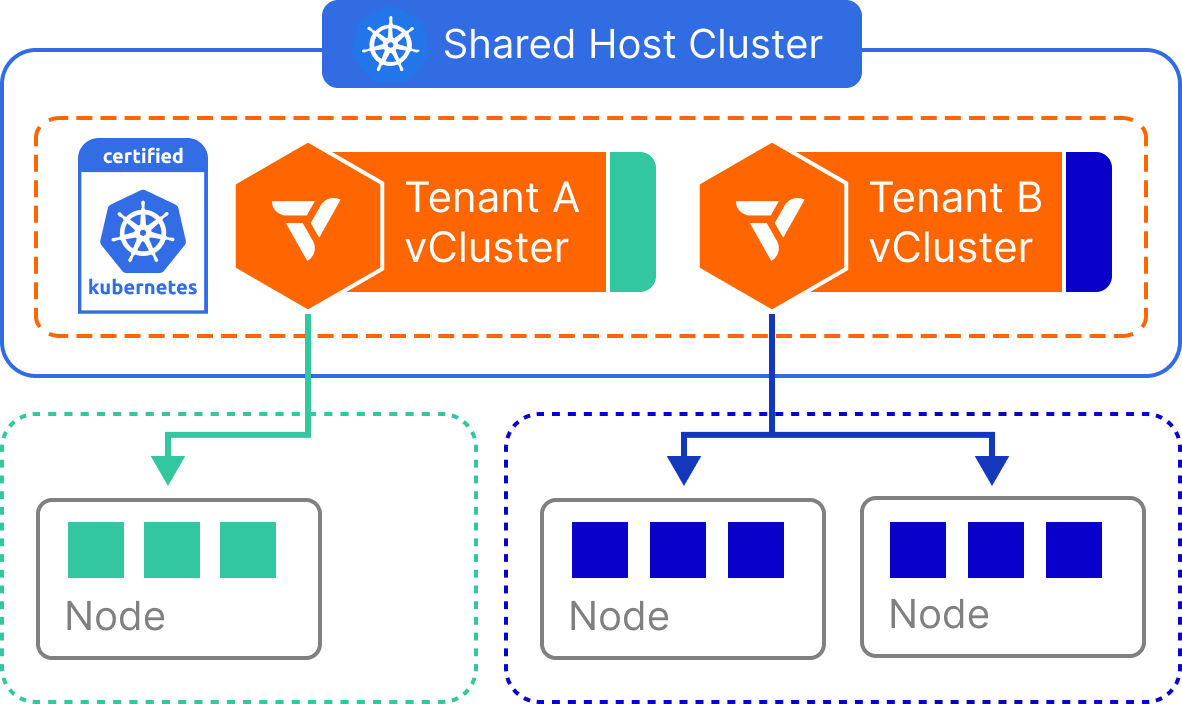
Nodes can come from any Linux infrastructure: bare metal servers, cloud VMs, or any manually joined Linux machine. With Auto Nodes, vCluster Platform can provision and deprovision nodes automatically.
This model suits GPU tenants, regulated workloads, and any environment where full infrastructure separation is required.
Shared nodes
Tenant workloads run on the same cluster that hosts the control planes, sharing the existing node pool. Multiple tenant clusters run side by side on the same physical nodes. A syncerSyncerA component in vCluster that synchronizes resources between the virtual cluster and the host cluster, enabling virtual clusters to function while maintaining isolation. component translates workload resources from each tenant cluster into a dedicated namespace on the underlying cluster. Each tenant sees only their own namespaces, pods, and services. The translated copies are invisible to them.
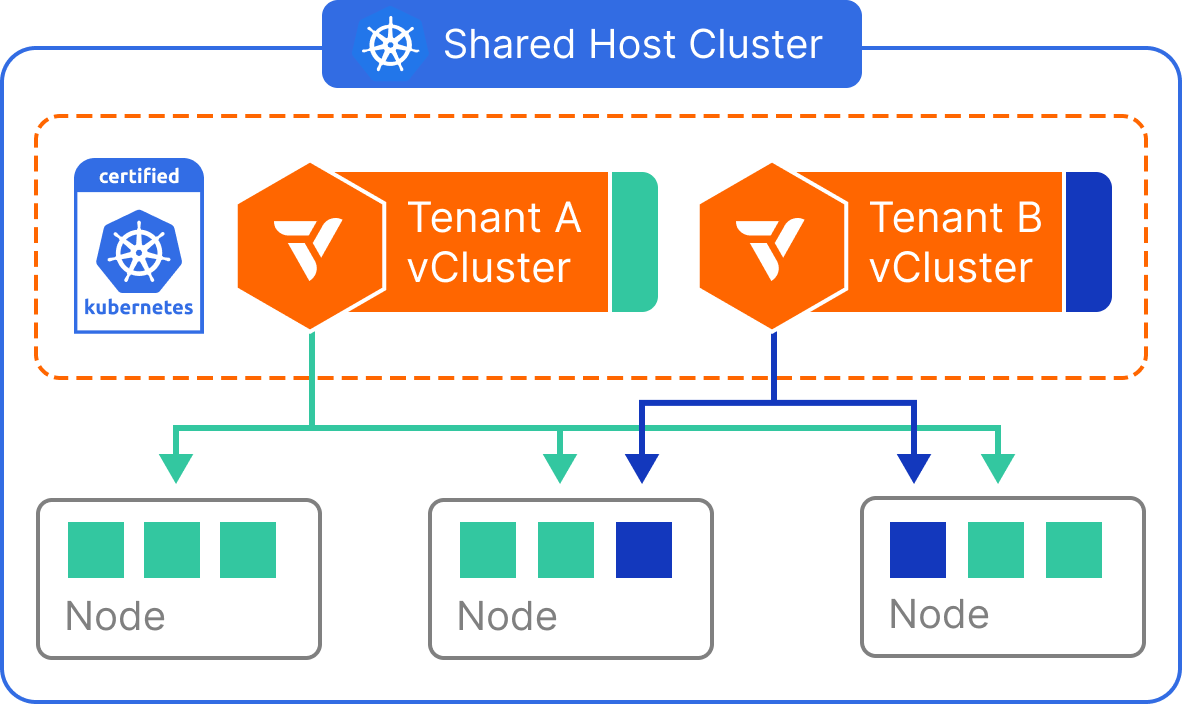
This model suits developer environments, CI/CD pipelines, and high-density internal platforms where compute separation is not required.
For tenants that need predictable per-tenant compute without full Private Nodes, you can scope workloads to a labeled node pool using Dedicated Nodes. Node selectors enforce placement on a reserved subset of the underlying cluster's nodes without provisioning separate infrastructure.
Worker node comparison
| Feature | Private Nodes | Shared Nodes | vind (Docker) |
|---|---|---|---|
| Isolated control plane | Yes | Yes | Yes |
| Custom CNI | Yes | No | Yes |
| Custom CSI drivers | Yes | No | Limited |
| Isolated network | Yes | No | Yes |
| Reuse Control Plane Cluster controllers | No | Yes | No |
| Tenant workloads visible on Control Plane Cluster | No | Yes | No |
| Automatic node provisioning | Yes | No | Yes |
| Requires Control Plane Cluster | Yes | Yes | No |
| Suitable for local development | No | Limited | Yes |
| Suitable for CI/CD | Limited | Yes | Yes |
| Infrastructure overhead | High | Low | Low |
Virtual Nodes
Virtual Nodes add a strong isolation boundary between tenant workloads at the node level. Using vNode to virtualize node boundaries, each tenant cluster gets its own view of the node environment. vNode enforces taints, tolerations, and scheduling boundaries per tenant.
Virtual Nodes are not a separate deployment choice. They are an isolation layer that applies to any deployment model — shared nodes, private nodes, or Standalone. This makes them particularly valuable for GPU workloads where strict per-tenant separation is required regardless of how the underlying nodes are deployed.
Syncer
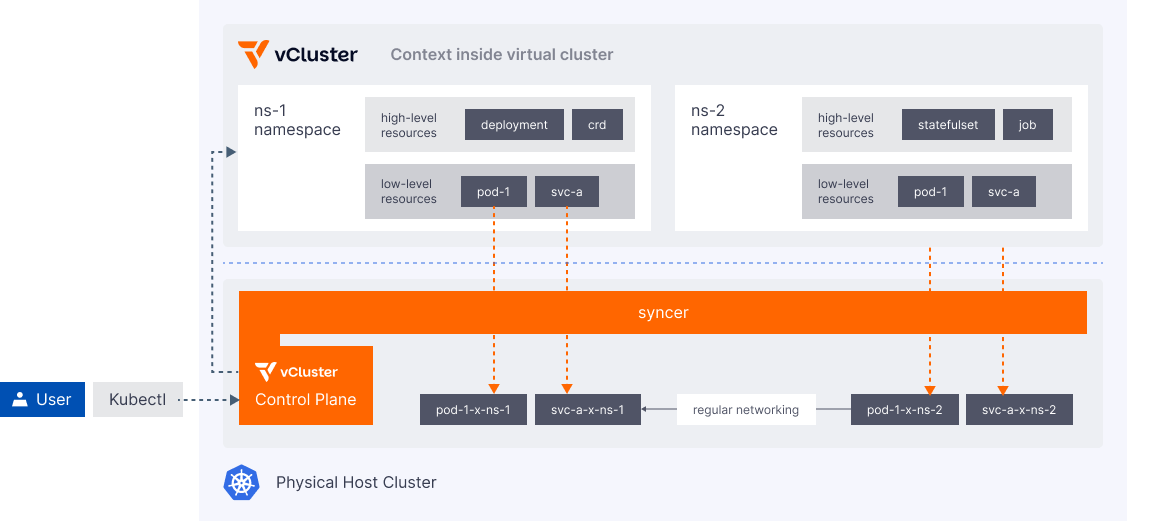
The syncer links the tenant cluster to the Control Plane Cluster. It keeps the two environments consistent so tenants see a complete, functional Kubernetes cluster without direct access to the Control Plane Cluster. Its role depends on how worker nodes are deployed.
With private nodes, only control plane state is synchronized. The syncer coordinates the tenant cluster's API server with the underlying infrastructure. From an operator's perspective this is nearly transparent. Workloads run directly on dedicated nodes with no sync overhead.
With shared nodes, the syncer also translates workload resources between the tenant cluster and the underlying cluster. This includes Pods, ConfigMaps, Secrets, Services, Ingress, and Gateway API objects. Each resource type has specific sync behavior. Networking resources in particular require careful configuration. If you are deploying with shared nodes, read the full sync documentation to understand what is synced and how to configure it for your workloads.
Networking
Networking within tenant clusters covers communication inside the tenant cluster, between tenant clusters, and between tenant clusters and the underlying cluster.
The networking features below apply to shared nodes deployments, where the syncer bridges tenant cluster resources to the underlying cluster. With private nodes, tenant workloads run on dedicated infrastructure and networking is fully isolated per tenant.
Ingress traffic
Instead of running a separate Ingress controller in each tenant cluster, vCluster can synchronize Ingress resources to use the underlying cluster's Ingress controller. This reduces per-tenant overhead and simplifies DNS management across tenant clusters.
DNS
By default, each tenant cluster deploys its own CoreDNS instance. CoreDNS lets pods within the tenant cluster resolve other services in the same environment. The syncer maps service DNS names in the tenant cluster to their corresponding IP addresses on the underlying cluster, following Kubernetes DNS naming conventions.
With vCluster Pro, CoreDNS can be embedded directly into the control plane pod, reducing the per-tenant footprint.
Communication within a tenant cluster
-
Pod to pod — Pods within a tenant cluster communicate using the underlying cluster's network infrastructure. No additional configuration is required. The syncer ensures Kubernetes-standard networking is maintained.
-
Pod to service — Services within a tenant cluster are synchronized to allow pod communication, using CoreDNS for domain name resolution.
-
Pod to underlying cluster service — Services from the underlying cluster can be replicated into a tenant cluster, allowing tenant pods to access platform services by name.
-
Pod to another tenant cluster's service — Services can be mapped between tenant clusters using DNS configuration that routes requests from one tenant cluster to another.
Communication from the underlying cluster
- Underlying cluster pod to tenant cluster service — Pods on the underlying cluster can access services within a tenant cluster by replicating tenant cluster services to any namespace on the underlying cluster.